A Blank Starter StoreFront Child Theme For WooCommerce

Published on
–
2
min read
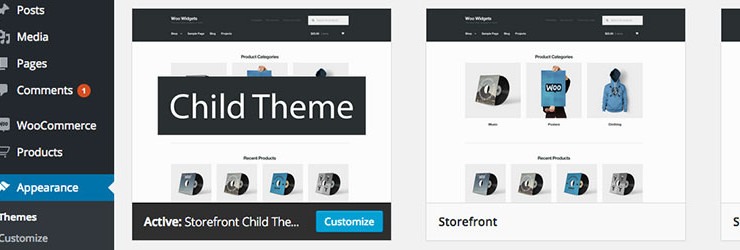
The best practice way to customize StoreFront for WooCommerce theme is to create a child theme for your project that allows you to store any code customizations. To make it easy for you to begin customizing StoreFront I have created a simple blank child theme that’s ready for you to install and quickly add your custom code to.
When customizing StoreFront or any WordPress theme for that matter you really should be using a child theme to store any custom code like CSS, HTML and PHP you may need to add to your site. By storing this within a child theme, it means that you can always keep up to date with the latest version of StoreFront via auto updates knowing that none of your custom code will be overwritten during this process.
A product developer may change something within the parent StoreFront theme in the future that may also require a little tweak in a StoreFront child theme, This is far less work than trying to maintain or update a parent theme where code has been added directly to the theme’s template files themselves though.
Never do this, Like Ever!
How To Use The StoreFront Child Theme
Firstly download the child theme from Github below in .zip format and install it on your WordPress site in the way that you would install a normal parent theme by uploading it via the admin dashboard of WordPress.
Alternatively you could upload it via FTP to your sites /wp-content/themes/ folder within your WordPress install.
Blank Starter StoreFront Child Theme on Github
Adding PHP To The StoreFront Child Theme
Any pluggable functions, custom functions, hooks or filters that you write should be added to the child themes functions.php file.
Adding CSS To The StoreFront Child Theme
Any custom CSS that you write should be added to the child themes style.css file below the information text within that file.
There is also a SASS style.scss file included within the child theme just in case you wish to use SASS instead of plain CSS.
19 responses to “A Blank Starter StoreFront Child Theme For WooCommerce”

May I use this child theme in another website, Stuart?
Hey Janet, The child theme is free for use on any website you wish and will allow a starting point for your customisation’s to the free WooCommerce Storefront theme.
Hey there,
thanks for the theme! How do i enqueue (and process) the sass from the assets folder?
Hi Stuart, a question from the home of Woo – Cape Town – what is the difference between your child theme and using a plugin such as ChildifyMe?
Hey Janek,
I haven’t personally used the plugin you reference ChildifyMe so I’m not 100% sure how exactly it creates it’s child themes, which process it uses and what files it creates.
The blank child theme for Storefront is just a simple starter template with the bare basics included which makes it lean and efficient. Also as Storefront automatically loads the parent themes CSS even if using a child theme this theme does not en-queue any CSS in the traditional child theme manner as it is more efficient than @importing it in the child theme style.css file for example.
You can read more about this in the child themes functions.php file on Github.
Great work Stuart,
I’m having problems with the Susy grid…when I try to @import spans into the SCSS file it throws an error. I’ve been looking for a solution…but can’t find one.
Any suggestions?
Hey Mac,
How have you loaded Susy is it via an app like codekit or similar which uses @import “susy”; to load the Susy toolkit like this below.
Hi there, total newbie here…
I`m trying to personalize this theme, but the nav menu dont show at the menu options…
any suggestions ?
Hey Ramos,
The starter theme does not remove or affect any of the default Storefront theme behaviour with regards to menus or similar. All default WordPress menus including storefronts are located at WordPress Admin > Appearance > Menus.
Hi there,
Thanks for your nice presentation on A Blank Starter StoreFront Child Theme For WooCommerce. Hope this article will be helpful for the users.
Thank you so much Stuart, based on your blank theme I made my new theme, you can check it here: http://kalibrado.com
Wow, I love your theme. I really want mine to look like that but I don’t have an Idea how to design it.
I am also having issues inserting Google Tag Manager.
Hi Stuart!
I’m totally new to SASS. Is it possible to override the “base color scheme” in _variables.scss in Storefront? How would I do that in the child theme?Thanks for any help!
Hey Ben,
Usually, you don’t need to override all the CSS within a file as you may only be editing certain elements. You can simply copy over the specific elements you are going to change from the original file into your child themes
/assets/style.scssfile and then make your changes to those before compiling the/assets/style.scssfile into the themes style.css file.You can learn a little more about SASS from this free course below as it gives a good introduction to what a CSS extension language is and how, why it’s become so popular.
Thanks for creating this. I have used this on a number of big woocommerce projects and it works beautifully every time for a custom theme with the storefront child theme.
Stuart,
Is there an update to the Storefront Child theme that is compatible with the current version of WordPress?Hey Sean,
The child theme should still work with the latest version of WordPress. Let me know if you encounter any issues though 😉
Hello Stuart, is any update for theme? i hawe issues with emails, some delivered some not? Woocomerce says i need to update theme or old templates.
thanks.


Leave a Reply