How I Use TDD With AI Coding Tools to Build WordPress and WooCommerce Plugins.

Published on
–
6
min read
In the olden days before AI development, building a WordPress plugin meant writing every line of code yourself, staring at the WordPress Codex for longer than you’d like to admit, and Googling the same WordPress and WooCommerce hook names repeatedly. Then AI coding tools like Claude Code and Cursor came along and changed everything, or so I thought. For a while, my approach was functional but reactive: describe what I wanted, have the AI write the code directly into the plugin, and then run automated tests to check that it worked.
I’ve been using PHPUnit for plugin testing for a long time now, so the tests were already in place. The problem was the order. I was writing code first and tests afterwards, mostly to confirm what had already been built. That meant the AI was still making its own assumptions about how things should work, and those assumptions were only challenged once the code already existed. When I started working seriously with AI tools, I realised that flipping that around made the whole process more reliable. Writing the tests first and letting the AI write the code to pass them meant the AI always had a clear target.
That shift is what this post is about. If you are just getting started with AI-assisted development for WordPress or WooCommerce, I hope this gives you a solid foundation to build on. Getting the most from tools like Claude Code and Cursor is not just about knowing how to prompt them well or what skills you provide to the AI. It is about having a workflow that keeps the code reliable as you move towards a plugin that is hopefully ready for production.
What TDD Actually Means
TDD, or Test Driven Development, is a development approach in which you write automated tests before writing the code that those tests check. The cycle is short: write a test that describes the behaviour you want, watch it fail because the code does not exist yet, then write the minimum code needed to make the test pass.
If that sounds backwards, it is. Deliberately. Writing the test first forces you to think clearly about what you actually want the code to do before you start writing it. It also means you end up with a test suite that grows alongside your plugin, and that suite becomes a safety net you can run any time something changes.
For WordPress and WooCommerce plugin development, the main testing tools are PHPUnit and wp-env. If you have not used wp-env before, it’s an official tool from WordPress that spins up a full local WordPress installation inside Docker, with PHPUnit and the WordPress test framework pre-configured. That means tests run against real WordPress internals: real WP_Query objects, real taxonomy queries, real WooCommerce order states. Not mocks. That matters because mocks would miss a fair number of the bugs that actually occur.
To get Docker running on your machine, install Docker Desktop, which is available for Mac, Windows, and Linux. Once that is running, the official WordPress guide to getting started with wp-env covers everything you need to set up a local environment.
Why TDD Works So Well With AI Coding Tools
TDD and AI coding tools work well together, and the reason is almost the reverse of why TDD is useful without AI.
Without AI, TDD is useful because it makes you think before you code. With AI, however, TDD is useful because it gives the AI something concrete to aim at.
When I used to describe a feature in plain language, for example, “when a product is added to the cart, check if the customer has an active subscription and apply a 10% discount if they do”, the AI would make a reasonable attempt, but it was making assumptions along the way. Which cart hook should it use? How should it check for an active subscription? What should happen if the customer is a guest? I did not always specify, and the AI would fill in the gaps in whatever way seemed reasonable to it.
When I write a test first, I have to answer all of those questions myself. The test defines the expected behaviour precisely, in code. Then I hand the test to the AI and ask it to write the code that makes it pass. The AI now has a clear, unambiguous definition of what success looks like. It is not guessing. It is being implemented.
In my experience, that single change accounts for most of the improvement I saw in the quality of code output.
Matt Pocock’s AI Coding Workshop
A video that helped me think through this workflow properly is Essential Skills for AI Coding from Planning to Production by Matt Pocock, published on the AI Engineer YouTube channel. It is a hands-on workshop that runs for about an hour and a half and covers the full lifecycle of AI-assisted development, from turning vague requirements into structured plans to running an autonomous coding agent with TDD.
The part that clicked for me was the idea of slicing work into thin “tracer bullet” vertical slices: small, independently completable pieces of work that an AI agent can pick up, write tests for, implement, and commit. Rather than handing the AI a large, open-ended feature and hoping it produces something coherent, you break the work into defined units with clear acceptance criteria. The AI then works through them one at a time, and you can verify each one before moving on.
If you are just getting started with AI-assisted development, I would recommend watching this before you write a single line of AI-generated code. It gives you a solid foundation and a practical way to think about how to structure your work. Even if you are already using AI tools day to day, there is likely something in it worth taking away.
You can find more from Matt on his blog AIHero.
What My Workflow Looks Like in Practice
Here is how I approach a new feature or plugin now.
1. Define the behaviour first
Before I open Claude Code or Cursor, I write down what the plugin should actually do. Not in code, just plain English. What triggers the behaviour? What should the result be? What edge cases matter? For example: “When a product is added to the cart, check if the customer already has an active subscription. If they do, apply a 10% discount.” Simple enough, but precise.
2. Write the test
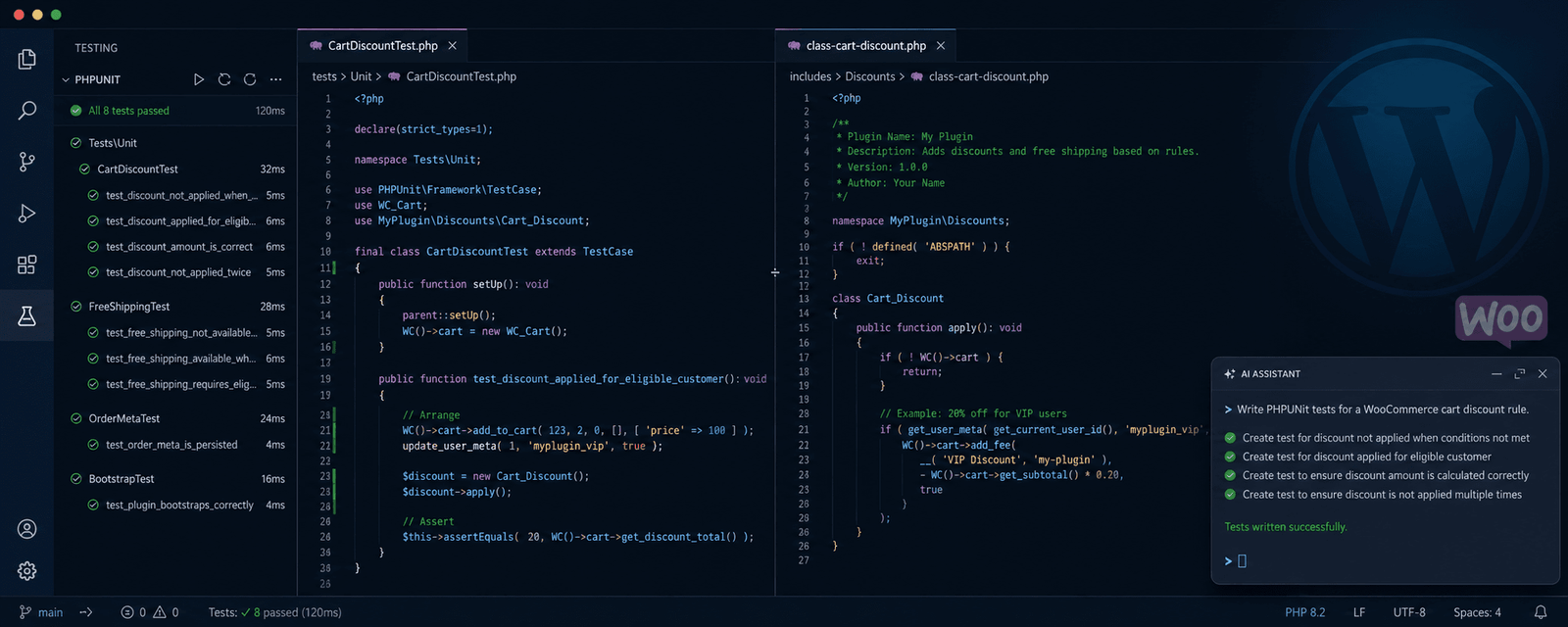
I use the AI to help write the PHPUnit test, describing the conditions I need: create a test cart, add a product, set up an active subscription for the customer, and assert that the 10% discount has been applied. At this point, the test fails because there is no plugin code yet. That is correct and the expected result.
Note: One rule I enforce in my development workflow is that the AI must not change the test code if a test fails. The job of the implementation code is to satisfy the test, not the other way around. If the AI believes the test itself is wrong, it must explain exactly why before I will consider any change to it. In practice, this almost never happens, but having that rule in place prevents the AI from quietly rewriting your expectations to match whatever it built just to get a pass on a test.
3. Ask the AI to make the test pass
I share the test with Claude Code or Cursor and ask it to write the plugin code that makes the test pass. Because the test is specific, the AI has a clear target. I am not asking it to interpret a description; I am asking it to satisfy a set of conditions already specified in code.
4. Run the tests
If the tests pass, I review the code the AI wrote before committing. I still do a manual check at this stage, but the automated tests have already done the heavy lifting. If the tests do not pass, I ask the AI to fix the implementation, pointing it at the specific failure. The AI must not touch the test code to make a test pass. It fixes the implementation. This loop is faster and more reliable than starting from a manual review alone.
5. Repeat for the next slice
Each new piece of behaviour gets its own test before the code is written. Over time, the test suite grows, and every time I make a change, I can run the full suite to check that nothing has broken.
A Note on wp-env and Real Production Sites
One caveat worth being honest about: wp-env is excellent for running TDD locally, but it is a clean environment. A real WordPress site has caching plugins, SEO plugins, theme hooks, CDN layers, and years of accumulated configuration. Some bugs will only surface on a real site, and no amount of local testing will catch them all.
My approach, therefore, is to use TDD to catch logical errors such as wrong conditions, incorrect return values, and missing nonce checks, and then deploy to a staging site and do a manual pass before anything goes to production. The test suite handles the mechanical verification; the staging environment handles the real-world integration check. Both matter.
Where To Go From Here
You do not need to adopt the full TDD approach all at once. A reasonable starting point is to write tests for any new function you add, even after the fact. From there, once you are comfortable with the test setup and the way tests are structured in WordPress, writing them first starts to feel more natural.
The shift that made the biggest difference for me was not learning the testing tools. It was changing the order of operations. Write down what you want the code to do. Write a test that checks it does that. Then ask the AI to write the code. In that order, the AI becomes more reliable, and the results become more predictable. In my experience, once the test suite is in place, you will wonder how you shipped anything without it.
If you have a different approach or questions about setting up PHPUnit with wp-env, leave a comment below.
Leave a Reply